This is an old revision of the document!
Rationale
The current implementation of the display dialog does mostly support cloning your display to a second monitor. Xrandr and xfconf can do a lot more than that (e.g. extend and adjust resolutions) and this should be made more accessible to users. In fact this is one of the more frequently asked questions, or requested features. (There was even an episode in the 2011 FOSDEM where an Xfce-dev couldn't get the beamer to work from his notebook for his presentation.)
Current design
Currently there's only a list of displays and a few combobuttons to change settings. The list is a bit too much in my opinion, because most people won't have many more than 2 displays maximum.
Features / ToDo
This is the list of features we want to implement in the first stage:
- Support extended desktop mode for 2 monitors
- Reflect this in the settings dialogs
Other features / problems:
- Support setting the primary monitor (Related bug: 9338)
- Improve visual representation of monitor-positions (e.g. via using iconview over treeview)
- Save settings based on EDID (automatic “display-setup-profiles”), i.e. different EDIDs at work and at home would result in always having the right config automatically, even if the screens have the same resolution (this would be particularly interesting with having primary monitor support in the panel)
Settings Dialogs
Minimal Dialog
The minimal dialog should only be called automatically when a new display is plugged in. It should provide users quick access to the most-used modes:
- Extend desktop to the left
- Extend desktop to the right
- Mirror displays
Furthermore it should contain a button linking to the display-settings dialog (see next section), in case the user wants to configure the new display more in depth (e.g. laptop docking). An additional checkbox should enable/disable presentation mode (see section above).
Theoretically (and according to Ubuntu's Multi-Monitor Spec) it's possible to (heuristically) detect whether the connected device is a TV or a Projector or an external monitor. We could try to use this information to set the window-title (at least).

This design currently features three 128px icons for the three basic modes, a tickbox for presentation-mode and a button to launch the display settings dialog.
Display Settings Dialog
This dialog will enable the user to change all the settings of all connected displays. The set of options basically depends on what RandR and the display drivers offer.
Improve the current dialog
To improve Xfce's dialog one would have to implement the “extended desktop”-mode of RandR, i.e. positioning the monitors “left-of” and “right-of”. (Theoretically there's also “above” and “below”, but in most scenarios multiple monitors are aligned horizontally.)
The “mirror displays”-checkbox would make the combobox for choosing the position of the screen insensitive.

Mockups
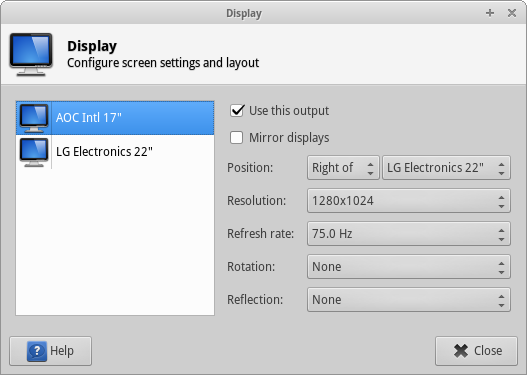
Status / Implementation
Minimal dialog:
- 4 options: Only Primary, Mirror, Extend Right, Only Secondary
- draw icons
- implement in code
- Hook up Advanced button
- Consider dropping “presentation mode”
Normal dialog:
- Fix xfconf channel binding warning
Fix rotation code with extended desktop mode- Add code for identifying windows
- Change rotation-combo-entry-name from “normal” to “none”
- Check why xrandr works better with Nvidia proprietary than our code
- Use iconview instead of treeview to illustrate monitor-positions (optional)
- Code review
General:
- Fix 3 commit authors (merge locally, then rebase interactive on origin/master and set a new committer)
- Celebrate the release!
Problems
- More than two monitors could cause overflow problems in the fancier version of the dialog
- The vertical/horizontal alignment of monitors (especially those with different resolutions) cannot be set in the current proposals. E.g. an external monitor with 1280×1024 and a laptop monitor with 1280×768, the ext-mon could be right of the laptop but then either at X=0 or at X=1024-768 depending on how you're using your desktop (panels etc.)
- Not all drivers send proper notifications so that we can trigger the –minimal dialog.